

The Boss Blog, Page 5 of 6
7 Social Media Tactics for Businesses That Struggle With Social

A strong social media presence is one of the best ways to be heard, and businesses are no exception to this rule. Forget the doorstep; there’s a whole world of potential customers and fans at your fingertips who are actively looking for brands that they can identify and engage with on a personal level. However, social media skills have to be learned, and many businesses struggle to find an audience and connect with them online. If yours is one of them, what can you do to make the best use of social media and all its benefits? How can you create content that gets people to stop scrolling and start reading, liking and sharing?
These 7 social media strategies will help your business build a presence and a following in the most crowded rooms online by creating content that entertains, educates, inspires and engages.

1. Make a plan
Before you rethink your entire social strategy, ask the tough questions. What are your goals as a business, and how will a strong social media presence help you to achieve them? What actions are you going to take to build presence, and how will you measure your success? Establish achievable and quantifiable objectives that are informed by your marketing and business goals, and put a time-frame on how long they should take to achieve. Find the right KPIs and tools to evaluate your progress, and don’t be afraid to change your tactics if something isn’t working.
And remember: don’t throw the baby out with the bathwater! If you’ve done something in the past that worked well, think about how and why it worked, and let it inform your strategy as you go forward. Similarly, look to past failures and learn from them: how have your past social efforts missed the mark, and how can you avoid these mistakes going forward?
With a roadmap to social success in place, your business can begin to make guided changes to its social strategy that work toward definite goals.
2. Know your audience
There are so many eyes and ears out there on the web, but do you know who is going to listen to your brand’s voice? Identifying and empathizing with your demographic and how they spend their time online makes a huge difference in making your voice heard. Picture your ideal customer. What interests them? What are they passionate about? What do they read, watch, and talk about with their friends? What are their goals, and how can the things you do help to achieve them? The better an understanding you have of your ideal customer, the easier it will be to find people like them online and speak to them with your content.
Listen to your audience and their conversations online about your industry in general and your brand in particular. Find the keywords and phrases in these conversations, learn how they’re used, and put them into practice in your own content. These keywords, which can include anything from industry jargon to misspellings of your company’s name, make up the language that your customers speak – to walk the walk, your business needs to talk the talk.
Finally, knowing the social media influencers your audience follows and engaging with the things that interest them can put you straight into your audience’s line of sight. Learn from what influencers do to engage your audience, and put it into practice in your own social media strategy.
3. Tell your story
Just like every person, every business has a story; no two are alike. Use your social media channels to build a narrative around your business that shows how it got to where it is today. Invite your audience to think about where they enter into that narrative: how are your followers involved and invested in your success? How can the things your business does change a person’s day, or change the way they live their lives?
One way to nail a narrative is to find your niche and own it. If your service or product fits into a certain lifestyle, build a story around it, and highlight your place in it. You know the unique value of your business – tell the world about it, and appeal to an audience that will benefit from it.
4. Get conversational
Social media is a two-way street, and driving engagement with your brand means taking hold of the reins and engaging with your audience. Make your business part of the conversation online by asking and answering questions, making friends, and following back. Things don’t always have to be about sales: sharing holiday greetings, discussing local events, and starting a dialogue about current news stories are all ways a business can drive engagement from their audience and learn more about their demographic.
Most importantly, share with your audience and encourage them to share with you! Ask your audience about what they want to see, take the feedback and deliver on it. If you see someone doing something cool with your product or sharing a success story, like it, retweet it, or give a shout out! When your audience is engaged with your brand, you become a part of their network, and everyone gets to see how your business fits into the lives of people just like them. This widens your audience and compounds your chances of generating engagement.
5. Go live!
Facebook Live has quickly become a powerhouse marketing tool for the biggest brands. Your followers are notified the moment you go live, and can join at any time to watch you broadcast the things that matter to the both of you. Is your company reaching a milestone, or releasing a brand new product? Has your warehouse just received a long-awaited and much anticipated shipment? Go live, and share the moment with your fans! Hold a live Q&A session, give fans a sneak peek at exciting things in the works, or simply broadcast a day in the life of an employee. When your fans see the real people behind your products or services and share in their successes, it lays the foundation for a fanbase that is engaged, loyal, and eager to see more!
6. Call to action
Make your statements short and sweet, and provide a way for your audience to follow up and learn more. Succinctness is a virtue and brevity is the soul of wit, especially in the fast-paced world of social media, and many social media platforms have embraced this philosophy to the point of integrating it into the very nature of user interaction. Twitter’s 140-character limit is an obvious example, but Snapchat’s ephemeral photos and videos and Instagram’s bite-sized Boomerang and Stories features are more recent examples. These limitations allow you to create captivating copy and striking visuals that inspire interest and are digested at a glance. Once you have their attention, encourage users to follow up by clicking a link, signing up for an email newsletter, or looking through a complete product line to get more of the content that hooked them!
7. Testing, testing, 1, 2, 3…
Finally, always be improving. Don’t focus on a single successful formula and stick to it. Variety is the spice of life, so keep an eye out for new trends, new conversations, and new mediums to get your message out there – but be scientific about it. Keep your eyes on the KPIs, put your strategies to the test by comparing their results, and learn from your failures as well as your successes to evolve along with your audience and your social media networks as they grow.
To wrap things up
The world of social media is constantly evolving, and with these tactics your business will find its place in the world beyond a brick and mortar shop or a domain name. Take stock of how far you’ve come, and set clear and measurable objectives that correspond to your business goals. Get to know your audience, tell them your story, and get involved by listening to what they have to say. Go live, give your followers a taste of what you have to offer, and provide the means for them to learn more about what you can do for them. Always pay attention to what works, learn from what doesn’t, and test out new ideas to keep improving your reach. Most importantly, remember the point of social media: to connect people! Use your social media channels as a platform to connect to and grow your audience, not just as a megaphone to talk at them. Now get out there and give the people something to talk about!
Into the blogosphere

So, your business has decided to take the leap into the blogosphere. Great! There’s no shortage of reasons why blogging can benefit your business. However, the world of business blogging may still feel like uncharted territory. What should your blog discuss? How many posts should get published, and how often? Just who the heck is going to read this stuff, anyway? This blog about blogging (a meta-blog?) is intended to help you hit the ground running with tips on creating timely and fresh blogs that meet the needs and engage the minds of your readership.
Lay the foundation
A great blog starts with a great plan, and the planning stage is where you first answer the big questions that will determine what you write about, who you write for, and why you’re writing in the first place. Before you fire up your typewriter, be sure to nail down answers to the following questions:
- Start with buyer personas—who is going to be interested in what your business has to say? What are their pain points, and how do your products or
services address and resolve them? Targeting your content to a specific readership makes it more likely to be seen (and shared).
- Develop a list of keywords relevant to your buyer personas. What kinds of search terms will they use when they’re looking for solutions? Knowing your keywords and putting them into use can optimize your blog to be found, guide your writing process and keep your copy consistent.
- How often will you write? The fresher and more frequent your content, the more you’ll have to offer to your readership, and the more Google’s page rankings will look favorably on your website.
- Set measurable goals in both the short and the long term. Are you looking to grow your email list and cultivate new leads, or are you focused on making your brand’s voice trusted and authoritative in your field? Whatever your goals, ensure that you have reliable metrics for measuring your progress.
Pick your topics
Are you drawing a blank every time you sit down to write? It may be easy to simply write a product feature or fluff up a sales pitch, but it’s important to remember that the point of your blogs is to provide value to your audience, not to sell to them. Take a look at your buyer personas and their pain points or problems, and assemble them into categories. These categories and their relevant personas will focus your writing and guide your use of keywords to optimize the SEO boost that the post provides. From here, you can begin to address some general topics.
Another great source of blogging inspiration is your existing customer base. Think about the kinds of questions from customers that you answer on a regular basis. Many of these represent common pain points, and can easily turn into full blog posts. For every one customer who comes in or sends and email with a common question, just imagine how many there are tapping their query into Google in search of an answer!
For example, a furniture store might write a blog on the difference in durability between leather, vinyl, and fabric upholsteries, or the different types of mattresses and their levels of support. An informative post that answers common questions and gives your readers information that they can act on is going to rank higher on search engines and position your business as a source of information that readers can trust.
Content (not copy) is king
Getting the copy down is one thing, but your blog will be as dry as a bone without engaging content to supplement that copy. The content that your copy supports, more than anything, is what sets your blog apart from your competitors and drives the solution to your readership’s problem.
It’s best to make your own, but there are plenty of resources out there for those who don’t collect data or employ a design team.
- Statistic Visuals
Provide relevant and substantiated statistics in the form of graphs and infographics—these add credibility to your posts, and can provide shock value when used properly.
- Header and Sub-header Images
Use visuals to break up the text. The text of headers and sub-headers can often be incorporated into a relevant image that draws the reader’s attention and invites them to read further. A well-chosen graphic or photograph can serve to break up the monotony of plain text as well as add a visual frame to the information the audience receives.
- Screenshots/photos
Finally, use screenshots or photos to demonstrate your solution in action. Remember that you’re here to provide value, not to sell.Getting to the end of a blog and feeling like you just read a really long ad means that you’re not going to come back for anything informative or authoritative. The more your readers can learn from your post, the more likely they are to return to your blog when they have another question that needs an answer.
What’s your Story?
Tell compelling stories (and write snappy titles). Narrative is a powerful tool, and we’ve known how to use it in sales and marketing for a long time. The same goes for your blogs. Framing the movement from conflict to resolution as a journey makes your audience more receptive to the information you have to share and puts it within a familiar and memorable framework.
Start with choosing a narrative voice. Anecdotes and stories about your business can use a first-person voice to draw readers in and demonstrate your unique way of overcoming challenges in ways that others can learn from and put into practice. A second-person voice (like the one used in this blog) allows readers to visualize themselves acting out your solutions as your offer them, while a third-person voice is suited to communicating stories about how your business has been part of another customer’s success.
Leverage your buyer personas and their challenges to tell stories that will engage your audience and show how your business fits into their lives. Your posts don’t have to read like a novel, but putting your info in action will help transform your blog from a lecture into a success story.
Sharing is Caring
You’ve written something you’re proud of, so be sure to put it out there! Share your new blog on your business’ other marketing channels, and put the work in to gain readers other than Googlers and regular visitors to your site. Leveraging your business’ social media following to widen your blog’s audience has the added benefit that a new post that a follower finds useful or interesting is always easy to share with their own network. The more readers that come to see your business as a trusted source of information, the better!
Your blogs can (and should) also link to one another. Where there’s an overlap in information or your blog posts address similar issues, have them link to each other! An engaged reader will always be ready to find out more, and demonstrating that you have more information to offer is never a bad thing.
Finish Strong
Finally, and importantly, bring things home with a with a call to action. Have you ever gotten to the end of an interesting article, how-to or blog post and been filled with the inspiration to immediately test what you’ve learned? While the point of your blog isn’t to sell, it’s important to give your readers something to engage with that allows them to take action and apply their new knowledge. Whether it’s more content, a link to a product or promotion or a contact form, your readers will have a way to act on their inspiration, and you will have a way to track engagement and turn readers into leads.
Here’s hoping this blog has inspired you to start writing your own! By following these tips, you should be well on your way to inspiring your own readers with engaging stories, compelling content, and valuable information that will position your business as a reliable source of information. Write well, help others and have fun!

Creating the Perfect Social Post
What makes for good social posting, anyway? In order to craft the perfect social post, we need to take a look at why people follow businesses in the first place.
- Interest in services and promotions: People love sales! Don’t get TOO excited though. Over posting this information is also one of the leading reasons people unfollow a business.
- Updates and information: People are interested in what your business is up to! Have new products? Moving locations? Getting an office dog? Post it!
- Communication: Social media is for connecting. People want to talk to you, and they want to review your products and services. Make sure you’re responding to them: it shows you care about your customers.
- Entertainment: Are you not entertained? People use social media to get a break from their humdrum day. Post content that will put a smile on their faces or give them something to think about. Hint: it doesn’t always have to be related to your business.
So now that we’ve got a good idea of what people want to see, how do we make the magic happen? When I write social posts, I use three main guidelines to direct me.

The 3 Golden Rules of Local Social Media Marketing
- Does it provide value? People engage with content that is relevant to them. Consider whether the post is solving a problem, starting a conversation or educating. People love to share information that is new and exciting. In order to provide the best value to your followers and customers, the vast majority (up to 80%) of your content should be useful or engaging information. In fact, posts promoting the business should only account for 10%-20% of the content.
- Is it emotionally engaging? People love stories, and they share content they connect with. Don’t be afraid to show the more personal side of your business. Really, who hasn’t teared up during a Coke ad or giggled at the Budweiser Clydesdales? Brands that go the extra mile to create an emotional connection with their customers stick in their memories longer. Why not post a cat video? Everyone loves a cat video.
- Is it visually stimulating? 1200 pixels are worth 1000 words. We’re talking high quality photos, videos and infographics here! Posts that include visuals get way more (almost 650% more) engagement than those without. Keep in mind that not all visuals are created equal. The best ones are the ones that you take yourself, because they’re local, personal and relevant. If you don’t have the capacity to take photos, reposting from other websites and profiles is a great way to keep your page relevant. Quality stock photos are also great resources, just make sure to pay attention to copyright!
Creating content for social media is essential—you need to be present where your customers are, and they’re on social. While it is free to partake, creating an effective social media strategy and sticking to it takes diligence and determination.
How to Respond to Positive Reviews

A good or bad reputation can mean the difference between a business thriving and expanding, or closing their doors for good. In the digital age, a business’s reputation is controlled by consumers using online review platforms like Yelp, Google and Facebook to announce the quality of their business publicly. The good news is that this lets businesses easily monitor and manage their online reputation, a power they can put to good use by responding in a timely manner to the reviews they receive.
While negative reviews often get this most attention, positive reviews are as or more important! It’s important to respond to positive reviews to thank customers for taking the time to review your business and to encourage others to do the same.
With 92% of consumers reading reviews online, businesses can’t afford to sit on the sidelines. An effective response will help ensure that a happy first time customer becomes a regular, and 70% of complaining customers will come back if you resolve the complaint in their favor. The first step is engaging with them.

How to respond to positive reviews
It’s simple. Thank the customer, name drop, promote and tell the customer what to do!
- Say thank you and be specific
No one would let a compliment pass them by in real life. Apply that same principle to a review response! And make sure to reiterate your customer’s compliment. This let’s the customer know that a real person took time out of their day to acknowledge them, and that feels good. - Use the business name and keywords
Don’t miss out on the opportunity to drive your business up in search results—positive reviews work wonders in search. Referring to your business name, location and category (restaurant, coffee shop, hotel, etc.) helps index that review online. - Market, market, market
Is your business famous for a certain secret sauce? Are you having a promotion next month? A review response is a great place to get the good word out. - Give your customer a task
Not as scary as it sounds. Invite them to try something different the next time they visit, or bring a friend!
As you can see, there’s a ton of potential hidden in a positive review response. Instead of one advertisement to rule them all, each review is an opportunity to sell your business!
How to respond to negative reviews

Believe it or not, the same premise applies to negative review response as it does to positive reviews. How you respond to a negative review impacts not only the reviewer, but all the sets of eyes that come afterward. Seeing a business handle a particularly challenging review online suggests that management is proud of their business, and willing to go the extra mile to maintain their reputation!
Make potential clients see the light with these four steps: apologize, promote, get offline, keep it simple.
1. Apologize and sympathize
The first step towards fixing a problem is acknowledging that one occurred. Regardless of what happened, a simple apology and sympathy for your customer’s experience goes a long way.
2. Promote
So the famous crab cakes weren’t up to par the day this particular customer visited. If they’re what you are known for, why not reiterate that? “Our crab cakes are usually a hit, we’re sorry to hear that they weren’t up to par when you visited!”
3. Move the conversation offline
Don’t open a can of worms. Keep the lid on tight by offering the reviewer the chance to reach out via phone, email or both.
4. Keep it simple
Avoid specifics and don’t ask questions. Those conversations are much better served in a space away from the prying public.
One last pro tip: leave your business name, location and category out of this. You don’t want your negative reviews showing up in search!

Now that wasn’t so bad, was it? You can use software to pull in your reviews from all over the web so you can respond quickly. And if you don’t have time, seek out our Reputation Boss software application to do it for you. Not only do we guarantee expertise, we guarantee it in a hurry: we respond to reviews as soon as our software pulls them in!

How To Avoid Having An Ugly Website

Websites are important for every business. In today’s digital age, having accessible online information is crucial for success. Just having a website isn’t enough, though. What matters is what’s on your website.
Website content needs to be geared toward making the consumer want to interact and engage with it. So, let’s take a look at what not to do when creating an appealing website, and I’ll show you what you should do instead along the way.
You’ve read this far for one of three reasons:
- You want to learn how to optimize your website for the best consumer engagement and interaction
- You’re worried that your website is ugly and came here for peace of mind that it isn’t
- You had nothing better to do and the catchy title of this article made you blow a little air out of your nose, which, in today’s digital age, translates to one “lol”
No matter the reason, you’re here for a solution, so let’s dive right in. Before we discuss any more, take a look at this website: http://thebiguglywebsite.com/. Don’t worry, it’s safe for work!
…
Are your eyes bleeding yet? I wouldn’t blame you.
We know your website can’t possibly look this bad, and we also know that this website is TRYING to look bad. Now, what are the chances you scrolled down to see what was listed on this site? If they gave out a million dollars at the bottom for clicking a link, chances are that you wouldn’t have walked away with a penny.
Why is this? Consumers don’t want to engage with unattractive content. Think of your own website content for a moment. If somebody looked at it and felt the same way you just felt, do you think they would stay and interact with it? Probably not.
Start by thinking of all the things you’ve hated on websites you’ve visited in the past. Chances are, one or more of these was on your list. If they weren’t, they will be now.
1. Ugly domain
Do you find it easier to go back to a website with a simple domain like website.com (an example), or do you prefer to type in randomwebsite123.org/data0=184/net%/ (another example)? You may be saying, “But hey, I just Google the name and click on the link!” Sure that might work for you usually, but would you be happy having to find your favorite and most visited websites by Googling them every single day? You’re better off having a website that people can remember if they choose to. A consumer’s first impression of a website is largely design-related, so don’t you think some of the people in that category want to see a neat and tidy domain? Of course they do!
2. Long loading times
I considered leaving a bunch of blank space here so you would have to scroll down and waste your time to prove my point, but I decided to make you read this sentence instead.
Consumers hate waiting. This is the digital age of instant information. It takes consumers only a split second to form an opinion about your website. That tiny amount of time shouldn’t be spent on a blank loading screen! Even worse than that, if there is a long loading time every time a consumer tries to interact with your website or navigate the different pages, they are going to get increasingly annoyed.
Here is the worst case scenario: You have a consumer who is ready to buy from your online shop, they start gathering up products into their cart, then they get fed up with waiting and instead buy from your competitor. Want to avoid the tragedy? Keep it fast!
3. Complicated or overwhelming interface
Does your website have too many buttons on it? Are people being bombarded with information? People are being trained to ignore huge amounts of website content due to websites crawling with ads. Keep it simple and focus on important topics or focal points that they can engage with. With plenty of consumers abandoning a site due to poor design, you can’t afford to hide your crucial information in text-garbage. Don’t lose consumers because they can’t find where you hid the crucial information on your jumbled page.
4. Automatic music or videos
Many people listen to music while they work or surf in their free time. If you’ve ever noticed a little speaker icon on the right side of your internet tabs, it means that sound is coming from that page. Many people’s first instinct is to kill that tab because it’s forcing disruptive sound onto their experience, and autoplaying audio or visual content can cause valuable consumers to leave your site.
If you have videos on your main page, great! Just make sure you let people click the play button on their own. At the very least, it will give consumers a chance to silence their other music and video sources before they listen.
5. Website isn’t responsive
Do you always look at a website on your computer, or do you sometimes use your phone or tablet? Don’t you hate it when you’re interacting with website content on your phone and you have to scroll all the way to the right to read the full line and then scroll all the way back for the next line? It’s terrible! Make sure your website bends and twists to fit every screen—this is called responsive web design, and it’s very important. If people don’t realize your website actually operates differently on their smaller screen, you’ve done something right.
Your website content is one of your most important marketing tools. Whether or not people engage can mean the difference between one dollar and one million dollars in revenue. It’s worth it to take the time to make your website beautiful.
Critical Data For Online Business Listings
Listings for local SEO
If you want to rank well in local search, you need consistent NAP data, website, hours, and more across all major listing directories. This is essential for search engines to validate you as a credible local business.
The more accurate and consistent data there is about your business across the web, the more search engines will trust the validity of the business. And the more the search engines trust the business, the higher they will rank in local SERPs (Search Engine Results Page).
According to Moz in their 2017 Local Search Ranking Factors survey, 13% of professionals list citation signals as the most important element in Local Pack Ranking factor.

What’s in an online business listing?
The information contained in business listings can vary across verticals and directories—but some key pieces of information hold true across them all.
NAP Data
The most crucial data held in a business listing is the NAP data—name, address, and phone number information. NAP data is critical for the online visibility of any business, and every listing source contains this information for the businesses listed. Having correct NAP data ensures that not only will consumers find your business online, but that consumers will also have accurate, up-to-date information on how to contact you.
NAP data is also important for search engines like Google to display your business in geo-targeted searches. If someone is searching “good seafood” in the Boston area, the local Boston seafood places with correct NAP data will appear. Of course Google gives search ranking priority to business with correct NAP data—how else are they supposed to tell where you are, what you do, and if you’re even a legitimate business at all?
The stats
Consumers are looking for your business! What exactly are they looking for?
53% of mobile searchers are looking for directions.
50% are looking for business addresses
Despite the importance of accurate NAP data, our data shows that many businesses are failing even at this basic step into the world of listings.
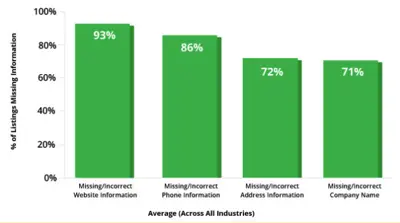
86% of businesses have either missing or incorrect company name information listed across all listings sources.
72% of businesses have either missing or incorrect address information listed across all listings sources.
71% of businesses have either missing or incorrect phone number information listed across all listings sources.

Hours of Operation
One of the most important details about your business to include besides NAP data is the hours of operation. When a consumer is searching for their business (or their goods/services), they have a high purchase intent, and are likely searching for an immediate need.
The consumer will likely a visit a business after the business is shown as “open” on their Google search.

If your business has no hours listed, the consumer would have to go out of their way to find out whether you’re open or closed from their website, or a phone call. Or, worse yet, they drive to visit your business and find that you’re closed! Now they’re not only inconvenienced by not knowing your business hours, but they’re also upset for wasting their time. Let the negative reviews commence!
If your competitor has their business hours listed, they’ll likely capture that consumer. People just want their needs fulfilled—they’d be happy to spend their money at a business that has their hours correctly listed if they were coming in-store to make the purchase.
The stats
73% of purchases that result from mobile searches happen within the same day, and most (63%) within a few hours
76% of consumers report that they expected hours of operation information when conducting a search
Over 60% of consumers find that knowing the business hours helps them make their purchase decision
Consumers are often looking to make purchases the same day that they’re searching, so make sure they know your store is open when they go looking!
Websites
Does your business have a central “hub” of information to direct users to online? Throw that website link into your business listings. Consumers will often travel from Google search into a business website to get a feel for the business, and learn more about what they’re offering. So obviously, including a link to your website is important for their online presence.
The stats
93% of businesses have either missing or incorrect website information listed across all listings sources
Only 7% of businesses have their website information correct across all listing sources
Nearly half of small businesses don’t have a website (Clutch)

If a user can find your website, they’ll get a better impression of your business, and likely have a more positive experience. With nearly half of small businesses not having a website, you can make your business stand out on the SERP by including your website data in the listing.
Other listing information to include
Depending on your business vertical, there may be other pieces of information important for you to include in their online business listings.
- Payment methods
- Services
- Brands
- Holiday hours
- Photos
- Social profiles
- And more!
The more information you include across all listing sources and directories, the easier it will be for consumers to find your business and purchase your products and/or services.
Business Website Essentials

Telling a small business owner to “assume the perspective of your customer” is one of those classic easier said than done problems. It’s not for lack of trying, but owning a small business isn’t just a job, it’s a lifestyle. And when you put that level of passion and commitment into something, your unique familiarity with it can be tough to shake.
Yet this is the simplest way to quickly optimize your website. By deeply considering your customer’s perspective and buying journey, we can make decisions that put everything in the right place for the customer to easily and quickly complete their interaction with your business and maybe even leave a nice review to boot.
While it’s absolutely essential to have each of these elements be part of your website, the specifics of their presentation need to be in consideration of your specific customer demographics. Most notably will be the difference between information on an online store, where the priority is to drive sales, versus a traditional brick and mortar business, where the priority is to get them to visit you.
The must haves
Contact information
Much of your web traffic will be coming from customers looking to use your website as a tool to communicate with you. Whether by email, phone or in person, the information that helps them accomplish this needs to be a top priority. Placing an easily found “contact us” link in the top right corner of your website is never a bad move. But if your customers aren’t web savvy, consider putting your address, phone number and hours of operation right on the home page. Additionally, if your business location is a little off the beaten path, consider using a map application on your website to help people better understand your location.
Product information
This is a growing priority for small businesses online, as a huge number of searches now happen on mobile with the intent of “in the moment” product research, sometimes even in-store. This means that the more specific information you can have online about what you sell, the better. This may even lead to customer conversions while they are in a competitor’s store.
Keeping an up-to-date and functional product catalog online can be a lot of work, but it is most certainly worthy of consideration given the potential value. This is particularly important if your demographic skews younger and more web savvy.

Business description
Give a quick, easy-to-find snapshot of your business and history available for people interested in learning a little more about you. Keep in mind, if people are looking at this part of your website, they are likely close to buying. Make sure you put in a little marketing effort here to help seal the deal. Make it concise but include things like business history, location, relevant achievements and philosophy. It’s also not a bad idea to include customer testimonials if you have them.
Quicklinks to social channels
Social platforms like Facebook, Instagram and Twitter are all great tools to help foster a direct line of communication between your business and its biggest fans. Your website should prioritize getting those follows and likes as easy as possible by installing a quick link widget into the footer or header of your website. That way, no matter where you customer goes on the site they are always one click away from connecting with you on Social.
Content/media
It’s becoming more and more common to see small businesses feature active content strategies and it’s easy to see why:
- Content is authentic – No one likes being sold to, and content is a great way for a business to build a relationship while leaving the hard sell on the shelf.
- Content is made for local – A good content strategy can help a business establish itself as grounded in its local area through authentic stories that are for and about their community.
- Content is hyper-targeted – Based on how you answered the first three questions your website, at least a little, is likely targeting customers at a specific part of the sales funnel. Having a fully realized content strategy allows you to add balance to your site. For example, if your site is designed to drive new sales, perhaps the content can be targeted towards customer retention by adding value to those people already in the fold.
Easy content strategy win = how-to videos
These can be extremely effective and easy to produce. Plus, creating how-to videos gives you the platform to demonstrate your expertise. Double-win if it’s related to your business.
Putting it all together with design
When considering design and layout, it’s completely appropriate to look at it as an opportunity to infuse some of your business’s personality into your website’s look and feel. But heed this warning: design is where it’s most critical to consider the customer’s perspective. Too often small business owners create a website that works perfectly for themselves while failing to consider how it will work for their customers.
Here are two top level considerations when choosing a design.
Mobile functionality is king
This has to be top of mind at every stage of design. While most modern design templates are mobile functional, it’s worth taking second looks at the ones that do it best. And if you haven’t updated your website since the inception of the smartphone, you might want to think about a redesign.
Keep it simple
You may have noticed that this article really pushes the need for priorities. With that in mind, consider putting only the most crucial information on the home page. Your home page must include easy links to: contact info, product info and business description. After that, it becomes really dependent on your goals and objectives. But when considering the perspective of your customer, oftentimes less is more.
Build for speed
By keeping things simple and prioritizing mobile functionality you are likely also building for speed. But this point is critical enough that it bares repeating. Your site needs to be fast! According to a study from Forrester Consulting 40% of shoppers will wait no longer than 3 seconds of load time before abandoning a retail website. As well, Google uses load time as factor in determining your search rank so a slow site might even be keeping customers from finding you when they look online.
Final thoughts
All in all, it’s a pretty swell time to be building a website for your business. Hosting is cost effective and secure, design templates have never looked nicer, and there is plenty of great content out there to help guide you through the process. But if you are ever curious if your website is serving you well, just follow this tip from Kevin Lao at Google: take out your phone, pull up your site and ask yourself “do you like what you see?” Now go to your closest competitor’s site and ask yourself the same question. Your answer will tell you all you need to know.